

Everything you need to know before you launch — or move — your WordPress website.
Table of Contents

Introduction
WordPress has changed the way websites are built. What started as a simple blogging platform in 2003 has grown into the world’s most popular content management system, powering more than 43% of all websites on the internet and over 60% of websites that use a CMS.
From personal blogs and portfolios to online stores, news portals, and enterprise applications, WordPress gives anyone the flexibility to build almost any kind of website. But the platform is only half the equation — the other half is the hosting environment it runs on.
At eHostingServer, we’ve hosted WordPress websites since 2010. After supporting thousands of WordPress websites, we’ve noticed that most performance issues aren’t caused by WordPress itself. They usually stem from outdated PHP versions, insufficient server resources, inefficient caching, or poorly optimized plugins.
“A WordPress website’s success depends just as much on its hosting as it does on its design and content.”
A beautifully built site can still feel slow, insecure, or unreliable if it’s sitting on the wrong hosting plan. The right infrastructure, on the other hand, lets WordPress run at its full potential — fast pages, strong security, and room to grow.
What Is WordPress Hosting?
WordPress hosting is a hosting environment optimized specifically for WordPress websites. While WordPress can technically run on almost any Linux hosting plan, WordPress-optimized hosting includes server configurations, caching, PHP settings, security features, and management tools that improve performance and simplify administration.
Before recommending any specific plan, it’s worth breaking that down properly.
How Is It Different From Regular Web Hosting?
“Regular” web hosting is a general-purpose environment — it can serve any type of website, using any software. WordPress-optimized hosting takes that same underlying infrastructure and tunes it specifically for how WordPress works: PHP versions and settings suited to WordPress’s requirements, server-level caching designed for WordPress’s page structure, and pre-installed tools (like 1-click installers) that remove manual setup steps.
The underlying hardware isn’t necessarily different — the configuration is.
Do You Actually Need a Separate WordPress Hosting Plan?
For most websites, no. If your regular shared hosting already includes WordPress-specific caching, current PHP versions, and a 1-click installer, a separate “WordPress Hosting” product doesn’t add much beyond what you already have. A dedicated WordPress hosting plan matters more when your existing hosting doesn’t include these things — for example, a generic shared plan with no caching layer and an outdated PHP version.
Why eHostingServer Uses Optimized Web Hosting Instead
Rather than selling a separate “WordPress Hosting” product, we build WordPress-specific optimization directly into our standard Web Hosting plans — LiteSpeed + LSCache, 1-click WordPress installs, free SSL, and WordPress-tuned PHP settings come as standard, not as an upsell. That means you don’t need to figure out which product tier includes WordPress support — every Web Hosting plan already does.
The Hosting Spectrum, at a Glance
In practice, “WordPress hosting” isn’t one single product — it’s a spectrum of environments, each suited to a different stage of a website’s life:
- Shared Hosting — Multiple websites share the resources of one physical server, kept isolated from each other. This is the most affordable starting point.
- WordPress-Specific Hosting — A shared hosting variant layered with extra WordPress-only optimizations. Useful where the base shared hosting doesn’t already include WordPress tuning.
- VPS (Virtual Private Server) — Your website gets dedicated CPU, RAM, and storage instead of sharing them with other accounts. Suits websites with heavier traffic, WooCommerce stores, or custom software needs.
- Managed VPS — All the dedicated performance of a VPS, but with the hosting provider handling server administration — updates, patching, monitoring — so you don’t need in-house server expertise.
Which one matches your website? That depends on your traffic, technical comfort level, and budget — which is what the rest of this guide walks through, plan by plan.
Quick Answer
If you just want the short version, here’s how those categories map to our specific plans:
| Your Website | Best Fit |
| Personal blog / portfolio | Starter Cloud (Web Hosting) |
| Small business / marketing site | Growth (Web Hosting) |
| High-traffic or e-commerce site | Business Turbo / Enterprise Pro (Web Hosting) or Linux Cloud VPS |
| WooCommerce store, LMS, news portal | Linux Cloud VPS |
| Agency or enterprise app, no time to manage servers | Managed VPS |
| SaaS application | Managed VPS |
Not sure? Use this quick decision matrix
| If you are… | Choose… |
| Blogger | Starter Cloud |
| NGO | Growth |
| WooCommerce store | Linux Cloud VPS |
| School | Growth |
| LMS platform | Linux Cloud VPS |
| Agency | Enterprise Pro |
| SaaS | Managed VPS |
How Much Hosting Do You Actually Need?
Readers frequently ask: how much RAM or CPU do I need, and when should I upgrade? There’s no single right answer — actual requirements vary depending on caching, plugins, media, and traffic patterns — but here’s a reasonable starting point:
| Website Type | Monthly Visitors* | Suggested Plan |
| Portfolio | Up to ~5,000 | Starter Cloud |
| Business website | ~5,000 – 20,000 | Growth |
| WooCommerce store | ~20,000 – 75,000 | Business Turbo / VPS |
| High-traffic publication | 75,000+ | VPS |
*Actual requirements vary depending on caching, plugins, media, and traffic patterns. A lightweight blog with 60,000 monthly visitors may run fine on Business Turbo, while a plugin-heavy WooCommerce store with 10,000 visitors may already need VPS resources.
Read on for the details behind each recommendation.
eHostingServer at a Glance
| By Numbers | Descriptions |
| 🕒 15+ Years | In the hosting business since 2010 |
| 🌐 10,000+ Domains | Hosted and trusted worldwide |
| ⏱️ 99.9% Uptime SLA | Backed by proactive monitoring |
| 🎧 24/7 Support | Via ticket and live chat |
| 💾 100% NVMe Storage | Across every hosting plan |
| ⚡ 3,500+ MB/s | NVMe disk performance |
| 📶 <200 ms | Average server response time (TTFB) |
| ⭐ 4.8 / 5 | Rated “Excellent” on Google (245+ reviews) |
These aren’t just marketing numbers — they’re the infrastructure choices behind every plan: LiteSpeed Enterprise, CloudLinux + CageFS, Imunify360, and JetBackup 5.
Why Hosting Matters More Than Most People Realize
People often spend weeks picking the perfect theme or plugin — but hosting quietly does more heavy lifting than either.
Every time someone visits your site, your server has to:
- Process the request
- Run WordPress and execute PHP
- Query the database
- Load images and other assets
- Deliver the finished page to the visitor
Simplified, that request flow looks like this:
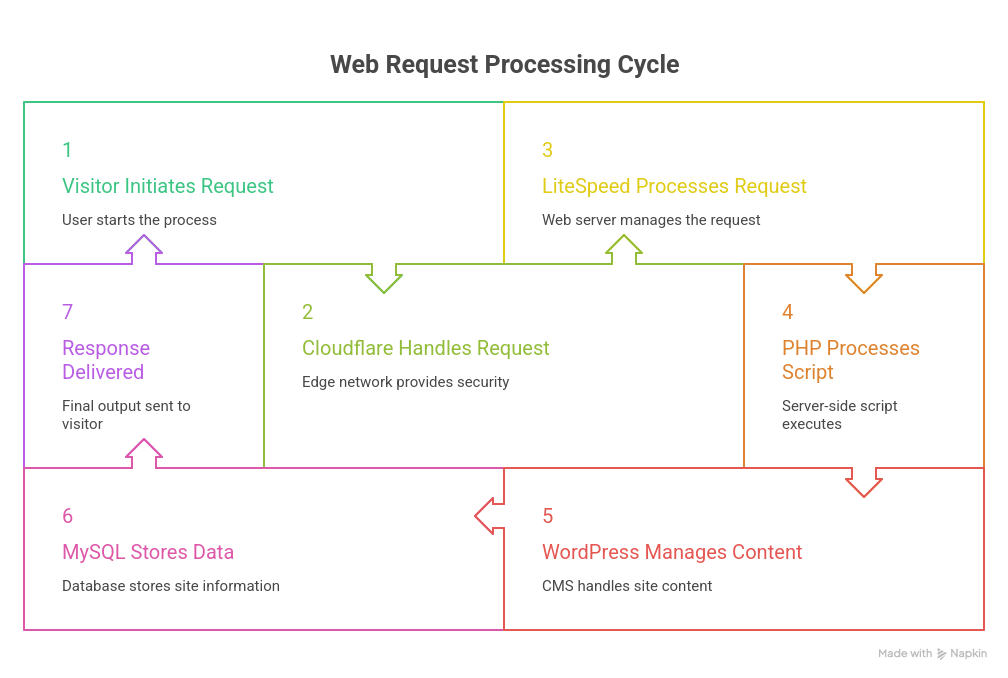
Each step adds a small amount of processing time. Modern infrastructure (CDN caching at the Cloudflare layer, a fast web server like LiteSpeed, tuned PHP, and an optimized database) shortens every link in that chain — which is why the specific technologies behind a hosting plan matter more than the plan’s name.
This happens thousands of times a day on active websites. If the server is slow or overloaded, visitors notice — no matter how good the design is.
Good hosting directly affects:
- Page speed and Core Web Vitals
- SEO performance
- Security
- Uptime and reliability
- How easily your site scales
Pro tip: If you’re only checking one thing before buying hosting, check the backup policy. Themes and plugins can be fixed in minutes; lost data usually can’t be.
That’s why hosting shouldn’t be treated as a line-item expense — it’s an investment in how your website performs for years to come.
Website Speed
Visitors expect websites to load quickly. Faster websites create a better user experience, encourage visitors to explore more pages, and improve overall engagement.
Modern hosting technologies such as NVMe SSD storage, LiteSpeed Web Server, and efficient caching mechanisms significantly reduce loading times compared to older server architectures. These technologies are part of the infrastructure we use at eHostingServer because they help WordPress websites respond more efficiently under both normal and peak traffic conditions.
Speed isn’t just a “nice to have” — it’s measurable. Here’s what to actually look at when comparing hosting on performance:
- TTFB (Time to First Byte) — how quickly the server starts responding. Anything under 200ms is considered strong for a shared or cloud environment.
- PHP benchmark results — how efficiently the server executes PHP code, which directly affects every WordPress page load.
- WordPress benchmark scores — real-world load testing using tools like a standard WordPress installation under simulated traffic.
- LiteSpeed vs Apache — LiteSpeed’s built-in caching (LSCache) generally outperforms Apache for WordPress-specific workloads.
- NVMe vs SSD — NVMe storage reads and writes data significantly faster than traditional SATA SSDs, which matters most for database-heavy sites like WooCommerce stores.
To make this concrete, here’s how an older hosting stack compares to a modern one — described directly rather than with inflated performance claims:
| Feature | Older Stack | Modern Stack |
| Storage | SATA SSD | NVMe |
| Web Server | Apache | LiteSpeed |
| Protocol | HTTP/2 | HTTP/3 |
| Caching | Plugin-based | LSCache |
None of these terms need to stay abstract — they translate directly into how fast your dashboard loads, how quickly pages render for visitors, and how your site holds up during a traffic spike.
Search Engine Visibility (SEO)
Search engines evaluate many factors when ranking websites, including page experience and performance.
Although hosting alone won’t guarantee higher rankings, a fast, stable website creates a stronger technical foundation for SEO by reducing delays and improving overall accessibility. Slow TTFB, frequent downtime, and poor Core Web Vitals scores can all quietly work against your rankings — regardless of how good your content is.
Good hosting complements your SEO efforts rather than limiting them.
Website Security
Cybersecurity is no longer optional.
WordPress websites are frequently targeted because of the platform’s popularity — not because WordPress itself is inherently insecure.
A secure hosting environment helps reduce risks through features such as:
- Free SSL certificates
- Firewall protection
- Malware scanning
- Regular software updates
- Automated backups
- Server-level security monitoring
Security works best as a layered approach, combining responsible website management with reliable hosting infrastructure. No single feature — not even a firewall — replaces the need for daily backups, timely updates, and sensible account access controls.
Reliability and Uptime
Imagine arriving at a store only to find it closed.
That’s exactly how visitors feel when a website is unavailable.
Downtime affects customer trust, search visibility, and potential revenue.
Reliable hosting aims to minimize service interruptions through redundant infrastructure, proactive monitoring, and ongoing maintenance. When evaluating hosting providers, uptime guarantees should be considered alongside support quality and infrastructure design.
Scalability
Every successful website grows.
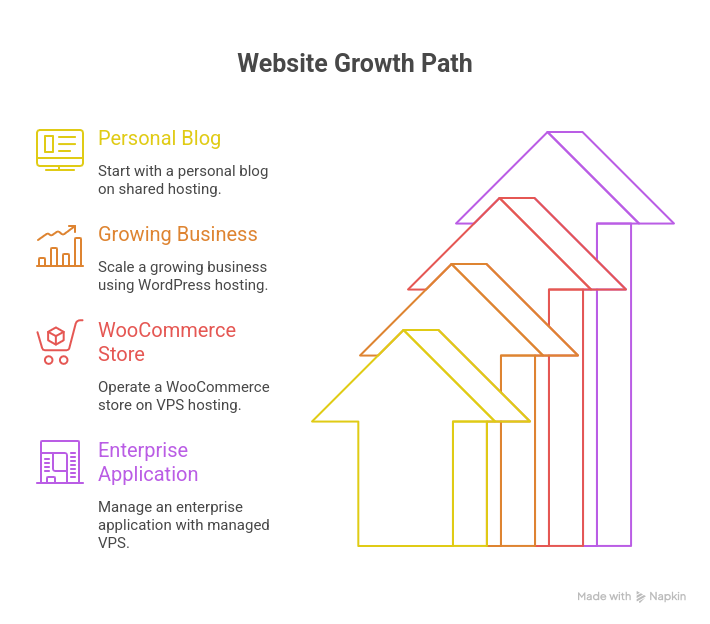
What works for a personal blog with a few hundred monthly visitors may not be sufficient once that website evolves into an online store or attracts tens of thousands of visitors.
A hosting provider should make growth straightforward. Instead of requiring a complete migration to another company, your hosting should scale naturally as your requirements change — from shared resources, to a VPS with dedicated CPU and RAM, to a fully managed environment that removes server administration from your plate entirely.
This philosophy has shaped our hosting portfolio at eHostingServer. Whether a customer begins with Web Hosting or requires a Managed VPS later, we aim to provide a clear upgrade path that allows websites to grow without unnecessary complexity.
Choosing the Right Hosting Isn’t About Buying the Biggest Plan
A common myth: the most expensive plan = the best performance. In reality, the right plan is the one that matches where your website is today, with room to grow.
- A student’s portfolio site doesn’t need VPS-level power.
- A local business often runs beautifully on entry-level Web Hosting.
- A WooCommerce store processing hundreds of orders a day benefits from dedicated VPS resources.
- A software company running multiple apps usually needs managed infrastructure.
Instead of asking “which plan is the best?” — ask “which plan fits my website today, and can I upgrade later without switching providers?”
How to Choose a Hosting Provider (Not Just a Plan)
Selecting a hosting plan is only part of the decision. Choosing the right hosting provider is equally important, because you’ll likely rely on that provider for years as your website grows.
Website owners often compare providers based solely on price. Affordability matters, but it shouldn’t be the only deciding factor — a low-cost plan can quickly become the more expensive choice if poor performance, frequent downtime, or limited support ends up costing you traffic or sales.
Here’s what to evaluate before you buy:
1. Performance and Modern Infrastructure
Look for providers that invest in technologies such as NVMe SSD storage, LiteSpeed Web Server, HTTP/3 support, current stable PHP versions, and CDN integration. Modern infrastructure helps websites load faster and stay responsive during traffic spikes.
2. Security as Standard, Not an Add-on
A reliable hosting environment should include multiple layers of protection — free SSL, a web application firewall, malware scanning, automated backups, and server-level monitoring — rather than relying on a single security measure.
3. Reliable Technical Support
Even experienced developers occasionally need help with a DNS issue, SSL configuration, email setup, or a server-related question. Before signing up, ask: Is support available 24/7? Through multiple channels? Does the team actually understand WordPress? Are migrations included?
4. A Clear Path to Scale
Can you upgrade from Web Hosting → VPS → Managed VPS without migrating to a new company? A provider offering a complete hosting ecosystem makes that transition far easier — no downtime, no lost configuration.
Why Modern Infrastructure Actually Matters
“Modern infrastructure” isn’t a marketing phrase — it has a direct, measurable effect on your website:
- NVMe storage moves data multiple times faster than older SATA SSDs, which shortens database query times for every page load.
- LiteSpeed + LSCache reduces server response time specifically for WordPress, compared to generic Apache/Nginx setups.
- HTTP/3 reduces connection overhead for visitors on mobile networks and higher-latency connections.
- CageFS/CloudLinux isolation stops a traffic spike or security issue on someone else’s shared account from affecting your site.
- AI-driven firewalls (like Imunify360) catch and block malicious traffic patterns in real time, rather than relying on static rule lists.
None of this is optional if you want a site that stays fast and secure as it grows — it’s the difference between hosting that merely works and hosting that’s actually built for WordPress.
What to Compare Before You Buy Hosting
When comparing quotes or plans across providers, look past the price tag and check:
- Storage type (NVMe vs SSD vs HDD) and how much is included
- Whether caching (like LiteSpeed/LSCache) is built in or a paid extra
- Backup frequency and how easy restores actually are
- Number of websites allowed per plan
- Migration support — is it free, assisted, or self-service?
- Renewal pricing, not just the first-term discount
- Whether you can upgrade in place or have to migrate to a new server
1. Web Hosting: The Starting Point for Most WordPress Sites
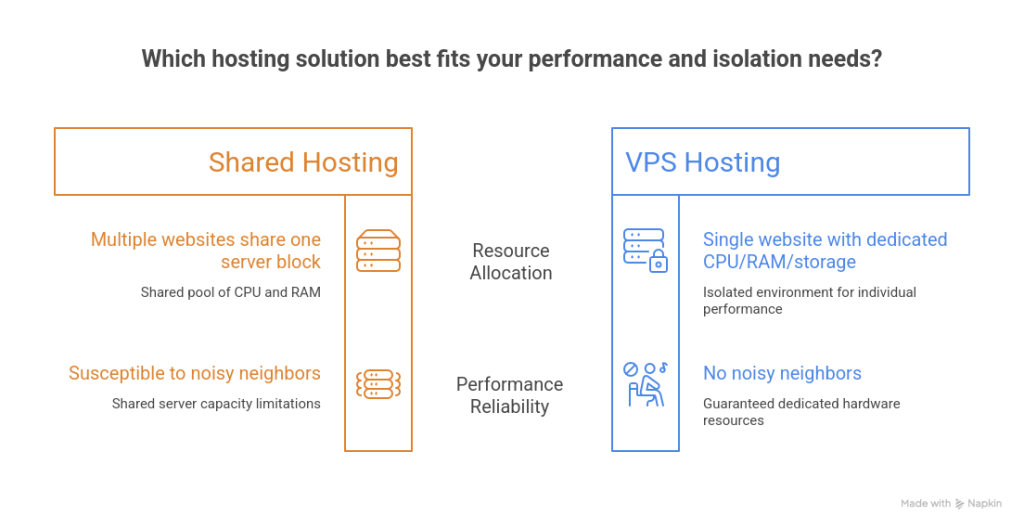
eHostingServer’s Web Hosting (shared cloud hosting) is where most WordPress websites start — and, for many, where they stay for years. Multiple websites share a physical server, but CloudLinux + CageFS keeps every account isolated, so a traffic spike on someone else’s site never slows down yours.
Best for: personal blogs, portfolios, startups, local businesses, NGOs, educational institutions, and company profile sites.
Every Web Hosting plan is already optimized for WordPress out of the box — you don’t need a separate “WordPress hosting” product to get good performance:
- 🚀 1-click WordPress install via Softaculous (300+ apps supported)
- ⚡ LiteSpeed Enterprise + LSCache, tuned specifically for WordPress caching
- 🎨 Sitejet AI website builder included free, if you want to design without code
- 🔒 Free AutoSSL (Let’s Encrypt, auto-renews every 90 days)
- 🛡️ Imunify360 security and web application firewall
- 💾 JetBackup 5 daily off-site backups
- 🌐 Cloudflare CDN integration from cPanel
- 🖥️ Full cPanel control panel with SSH/Git access
Web Hosting Plans
| Plan | Best For | vCPU / RAM | NVMe Storage | Websites | Starting Price |
| Starter Cloud | Students, blogs, portfolios | 1 vCPU / 2 GB | 5 GB | 1 | रू.2,100/yr |
| Growth ⭐ Most Popular | Small businesses | 2 vCPU / 4 GB | 20 GB | 10 | रू.5,600/yr |
| Business Turbo | E-commerce, high traffic | 4 vCPU / 6 GB | 50 GB | 20 | रू.14,000/yr |
| Enterprise Pro | Agencies & developers | 6 vCPU / 8 GB | 100 GB | Unlimited | रू.21,000/yr |
Prices exclude VAT and are current as of writing — check ehostingserver.com/web-hosting for live pricing.
All plans include a 7-day money-back guarantee and free migration if you’re moving from another host.
Who Actually Uses Each Plan?
Specs are easier to picture with real examples of who each plan suits:
- Starter Cloud is suitable for: a personal blog, a portfolio site, a photographer or freelancer’s showcase, a lawyer’s profile page, or a student project.
- Growth is suitable for: a restaurant, a local shop, an NGO, a school, a small clinic, or a marketing site for a growing business.
- Business Turbo is suitable for: an e-commerce store with regular orders, a business site with steady daily traffic, or a company running several campaigns at once.
- Enterprise Pro is suitable for: an agency hosting multiple client websites, a developer managing several projects, or a business needing unlimited websites on one account.
2. Linux Cloud VPS: When Shared Resources Aren’t Enough Anymore
Every growing website eventually outgrows shared resources — more visitors, a bigger database, a busier WooCommerce store, or custom software needs. That’s a sign of success, not a problem, and it’s exactly when VPS hosting makes sense.
Unlike Web Hosting, a VPS gives you dedicated CPU, RAM, and storage — no “noisy neighbors” — plus full root access to configure the server exactly how you want.
eHostingServer’s VPS runs on VMware ESXi with direct-attached NVMe storage, hosted in a Tier III data center in Kathmandu on HPE and Dell PowerEdge hardware with Intel Xeon and AMD EPYC processors. For visitors in Nepal, direct connectivity through NPIX keeps latency under 5 ms — a real advantage over servers hosted overseas.
Best for: WooCommerce stores, news portals, LMS platforms, membership sites, SaaS applications, developers, and agencies.
Linux Cloud VPS Plans
| Plan | vCPU | RAM | NVMe | Bandwidth | Starting Price |
| NP-1 | 1 Core | 4 GB | 40 GB | 20 TB | $4.50/mo |
| NP-2 | 2 Core | 8 GB | 80 GB | 20 TB | $10.00/mo |
| NP-3 | 4 Core | 16 GB | 160 GB | 20 TB | $25.00/mo |
| NP-4 | 8 Core | 32 GB | 240 GB | 20 TB | $49.50/mo |
Higher-tier plans (NP-5 to NP-7) are available for large-scale workloads. Prices shown are the discounted 3-year term rate.
This VPS is unmanaged by default — you get full root access, but OS updates, security patching, and backups are your responsibility (cPanel, CloudLinux, and Imunify360 are available as licensed add-ons). If that’s not something you want to handle yourself, the next tier solves that.
Signs You’ve Outgrown Shared Hosting
Not sure if it’s time to move up? These are the most common signals we see:
- Your hosting dashboard warns you about reaching CPU or resource limits
- Your WordPress admin dashboard feels noticeably slower than it used to
- WooCommerce checkout is slow or times out during busy periods
- You get frequent, unpredictable traffic spikes
- Your database has grown significantly larger over the past year
- You’ve received resource-limit or “excessive usage” notifications from your host
If two or more of these sound familiar, it’s usually a sign that shared resources are no longer enough — and VPS is worth a look.
3. Managed VPS: VPS Performance Without the Server Admin Work
Not every business has a Linux administrator on staff — and not every business wants one. Managed VPS gives you the same dedicated performance as a standard VPS, but eHostingServer’s team handles the server side of things.
Best for: growing businesses, agencies managing multiple client sites, high-traffic e-commerce, SaaS applications, and mission-critical applications.
Included with every Managed VPS plan:
- 🖥️ cPanel/WHM (5 accounts included)
- 🐧 CloudLinux OS for isolation and stability
- 🛡️ Imunify360 AI-powered security
- 🚀 Softaculous + JetBackup daily backups
- 🔧 Proactive security patching, 24/7 monitoring, and free migration
Managed VPS Plans
| Plan | CPU | RAM | NVMe | Starting Price |
| VPS Essential | 2 Core | 8 GB | 80 GB | $80/mo |
| VPS Professional ⭐ (Most Popular) | 4 Core | 16 GB | 160 GB | $110/mo |
| VPS Premium | 8 Core | 32 GB | 240 GB | $160/mo |
| VPS Ultimate | 16 Core | 64 GB | 360 GB | $260/mo |
In short: with Managed VPS, you get VPS-level power with a shared-hosting-level of hands-off simplicity.
How We Recommend Choosing a Hosting Plan
Think about where your website is today — and where you expect it to be in the next 12–24 months.
Typical growth path:
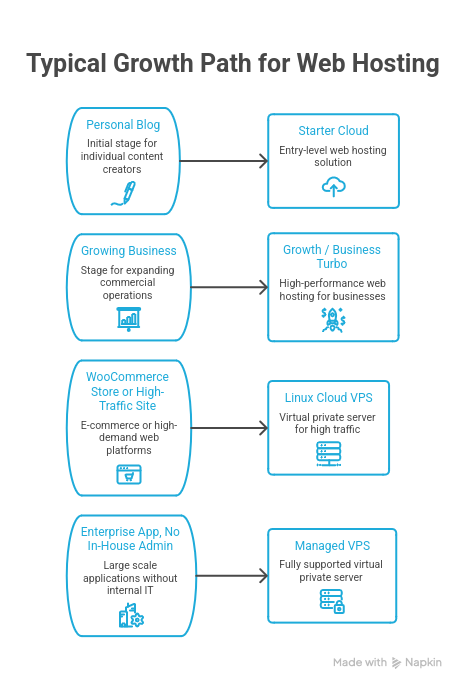
The advantage of staying with one provider through this journey is simple: you upgrade instead of migrating, which means no downtime and no lost configuration.
What to Look for in Any WordPress Hosting Provider
Whichever provider you choose, these features matter more than marketing claims:
| Feature | Why It Matters |
| NVMe SSD storage | Faster load times, better SEO |
| LiteSpeed / LSCache | WordPress-specific caching and speed |
| Free SSL | Security and browser trust |
| Daily automated backups | Protection against data loss |
| 1-click WordPress install | Faster setup, less manual work |
| 24/7 support | Help when something breaks |
| Easy upgrade path | Room to grow without switching hosts |
| Transparent pricing | No surprises at renewal |
Comparing Your Options Side by Side
| Feature | Shared / Web Hosting | Unmanaged VPS | Managed VPS |
| Dedicated resources | No | Yes | Yes |
| Root access | No | Yes | Limited (handled for you) |
| Server administration | Not required | Your responsibility | Handled by provider |
| Best for | Blogs, small business sites | Developers, custom setups | Growing businesses, agencies |
| Typical starting price | रू.2,100/yr | $4.50/mo | $80/mo |
| Ideal traffic level | Low to moderate | Moderate to high | Moderate to high |
Customer Scenarios: Matching Hosting to Real Situations
Specs are easier to picture with real examples:
- A local restaurant in Kathmandu with a menu, contact page, and photo gallery can comfortably run on Growth (Web Hosting) — traffic is modest and the site is mostly static content.
- A WooCommerce store receiving 50,000 monthly visitors with daily orders is better suited to Linux Cloud VPS, where dedicated CPU and RAM keep checkout fast during busy periods.
- A school or NGO publishing updates and hosting a handful of informational pages fits well on Growth, without needing VPS-level resources.
- An agency managing a dozen client websites benefits from Enterprise Pro or Managed VPS, where unlimited sites and proactive server management reduce day-to-day maintenance.
- A SaaS product with its own application logic typically needs Managed VPS, where root-level flexibility is paired with server administration handled by the hosting team.
Scenario-based thinking like this — matching your actual traffic and use case, rather than choosing based on price alone — usually leads to a better long-term fit than picking the biggest plan available.
Migrating to eHostingServer
A large share of website owners aren’t launching a brand-new site — they’re switching from an existing host. Migration is often the biggest hesitation, so here’s what to expect:
- How migration works: our team copies your website files, database, and configuration to the new server, then tests the site before pointing your domain to it.
- Downtime expectations: with proper DNS planning, migrations can typically be completed with little to no visible downtime for visitors.
- Email continuity: existing email accounts and mailboxes are migrated alongside the website so mail delivery isn’t interrupted.
- DNS propagation: once your domain is pointed to the new server, DNS changes can take anywhere from a few minutes up to 24–48 hours to fully propagate worldwide, depending on your DNS provider’s TTL settings.
- What the hosting team handles: file transfers, database migration, SSL reinstallation, and testing — reducing the technical burden on you.
Free migration is included with Web Hosting and Managed VPS plans.
eHostingServer vs International Hosting: What Actually Matters
A common question from Nepali website owners is whether to host locally or with an international provider (e.g., hosting based in Singapore, the US, or Europe). A few factors are worth weighing honestly, without unsupported claims in either direction:
- Latency: for an audience primarily located in Nepal, a server hosted in Kathmandu with local peering (like NPIX) typically delivers lower latency to local visitors than a server located overseas. For a global or international audience, a server closer to that audience may perform better.
- Support and time zones: local support means working hours align with Nepal Standard Time, which can matter for urgent issues.
- Billing: local providers commonly offer NPR billing, avoiding currency conversion and international card fees.
- Local infrastructure and compliance: a local data center can simplify considerations around data residency for organizations that prefer to keep data within the country.
The right choice depends on where your visitors are and what you value in support and billing — there isn’t a single correct answer for every website.
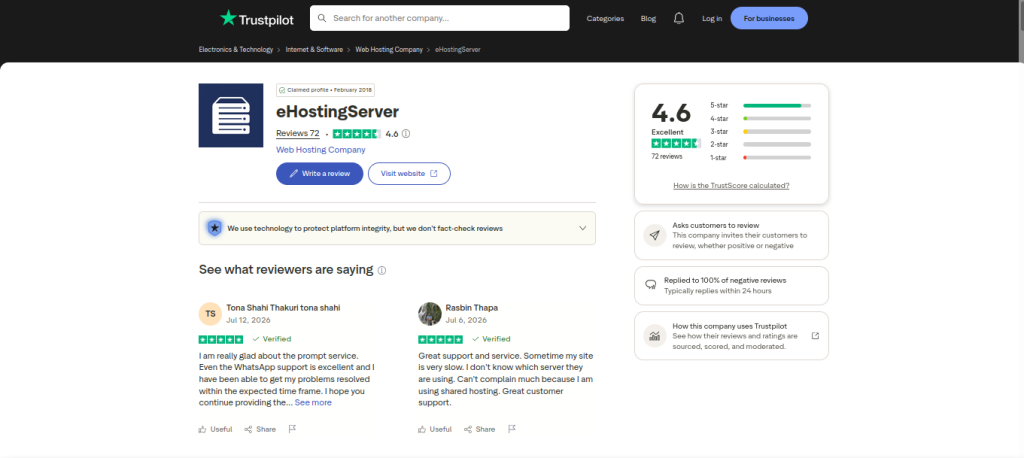
What Customers Say
“Servers are always up and running, with a prompt support team.” — Dipu Maharjan, on Web Hosting
“Everything runs smooth, and support is there when you need them.” — Benison, on Web Hosting
“Very good for the price — I’d suggest developers choose this for better performance.” — Ashish Shrestha, on Web Hosting
Common WordPress Hosting Mistakes to Avoid
Choosing the cheapest plan available — Price matters, but so do infrastructure, support quality, and upgrade options. The cheapest plan can become the most expensive if it means downtime or lost sales.
Buying more resources than you need — Enterprise-level hosting for a small blog rarely pays off. Match the plan to your current traffic, not your aspirations.
Ignoring backups — Before signing up anywhere, check how backups run and how easy they are to restore.
Forgetting about growth — Assuming your site will never need more resources is one of the most common (and avoidable) planning mistakes.
Frequently Asked Questions
Do I need a separate “WordPress Hosting” plan, or is regular Web Hosting enough? Regular Web Hosting is enough for the vast majority of WordPress sites. eHostingServer’s Web Hosting plans already include LiteSpeed + LSCache, 1-click WordPress install, and free SSL — everything a WordPress-optimized environment needs.
When should I upgrade to VPS hosting? When your traffic grows consistently, shared resources start feeling limiting, you’re running WooCommerce at scale, or you need root access for custom software.
Is Managed VPS worth the extra cost? Yes, if you’d rather focus on your business than on OS updates, security patches, and server monitoring. It’s the difference between owning a car and having a driver.
Can I upgrade my plan later without migrating to a new provider? Yes — upgrades are typically instant, and you only pay the prorated difference.
Is there a risk-free way to try it out? eHostingServer offers a 7-day money-back guarantee on Web Hosting plans, plus free migration if you’re moving from another host.
How long does migration take, and will my site go down? Migration timelines vary by site size, but with proper planning, downtime is typically minimal to none. See the migration section above for details.
Does hosting affect SEO? Yes, indirectly. Hosting doesn’t set your rankings directly, but slow TTFB, poor Core Web Vitals scores, and frequent downtime all work against SEO — so faster, more reliable hosting removes a technical disadvantage rather than adding a ranking bonus by itself.
Is WordPress Hosting faster than Shared Hosting? Not inherently — it depends on what’s actually configured. A well-tuned Shared Hosting plan (with LiteSpeed, LSCache, and current PHP) can match or beat a “WordPress Hosting” product that’s just shared hosting with a different label.
Can Shared Hosting run WooCommerce? Yes, for stores with low to moderate order volume. As traffic and order volume grow, database-heavy WooCommerce operations tend to benefit from the dedicated resources of a VPS.
How much storage does WordPress need? The WordPress core files themselves need only a few hundred megabytes, but real-world usage is driven by media uploads, plugins, and database size — most small to mid-sized sites are comfortable in the 5–20 GB range.
How many visitors can Shared Hosting handle? It depends heavily on caching and plugin efficiency, but as a rough guide, well-optimized Shared Hosting typically handles up to roughly 20,000–75,000 monthly visitors comfortably before VPS-level resources become worthwhile.
Can I switch hosting later? Yes. Whether you’re upgrading within the same provider or moving from another host entirely, migration (covered in detail earlier in this guide) lets you move your site without starting over.
Is LiteSpeed better for WordPress? For most WordPress sites, yes — LiteSpeed’s built-in LSCache is purpose-built for WordPress’s page and object caching needs, generally outperforming Apache setups that rely on plugin-only caching.
Do I need Cloudflare? It’s not mandatory, but a CDN like Cloudflare reduces load on your origin server and speeds up delivery for visitors located far from your server — worthwhile for most websites, and especially useful for sites with a geographically spread-out audience.
Final Thoughts
The best hosting plan isn’t the one with the most resources — it’s the one that fits your current needs while giving you room to grow. Understanding how performance, security, scalability, and support affect your website will help you make a better long-term decision, regardless of which provider you choose.
WordPress gives you the flexibility to build almost anything. But its performance, security, and reliability all depend on the hosting underneath it. Choosing the right plan isn’t about finding the cheapest option or the biggest server — it’s about matching your hosting to where your website is now, with a clear path to upgrade as it grows.
At eHostingServer, that’s been the approach since 2010: start with what you need, and scale from there — without switching providers.
Ready to get started? Compare Web Hosting plans → | Explore Linux Cloud VPS → | See Managed VPS →